
Small & Growing Businesses
Ideal for retailers, distributors, and brands that need automated order processing without managing on-site servers or IT infrastructure.

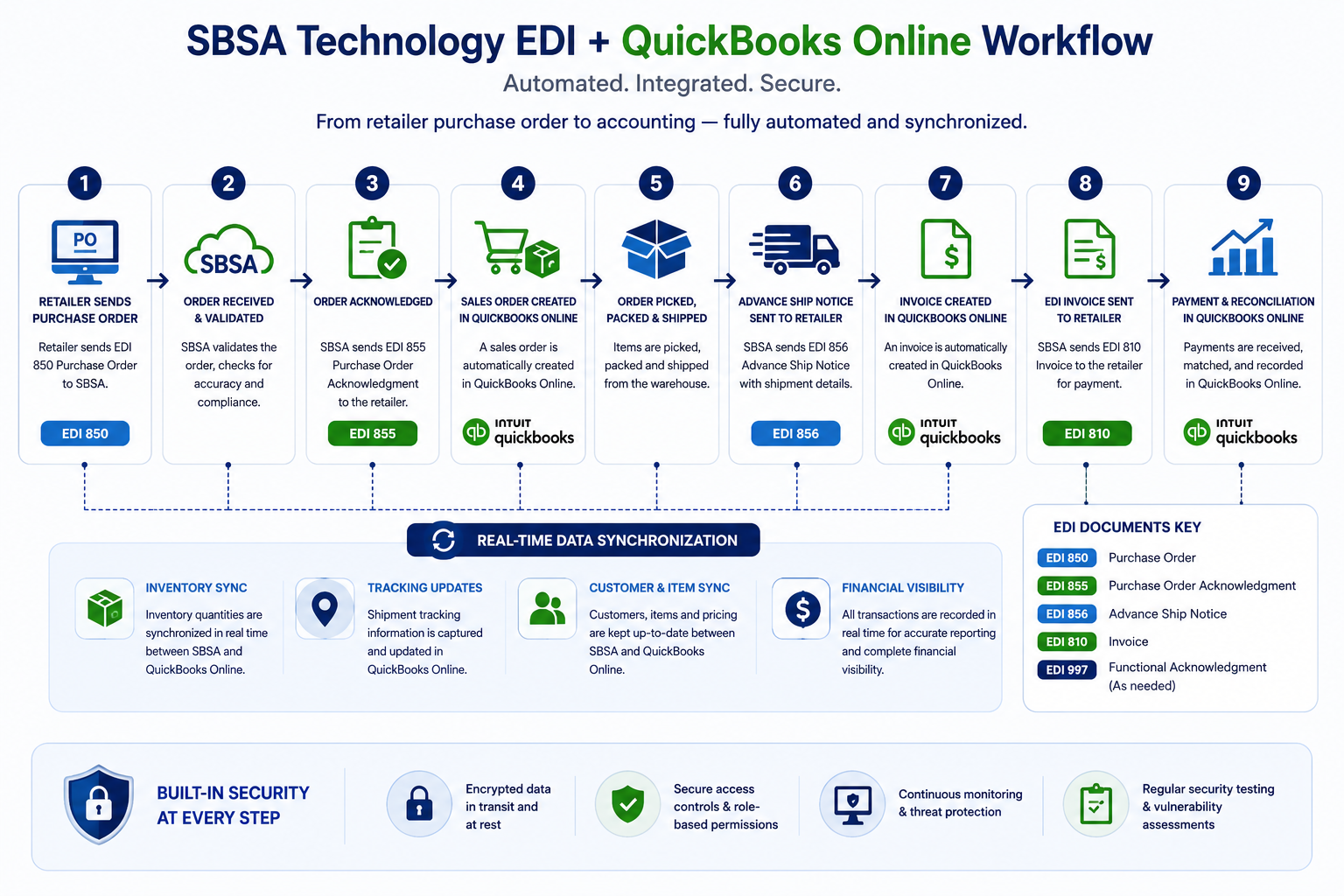
SBSA Technology connects QuickBooks Online and QuickBooks Enterprise directly to your EDI trading partners — automating purchase orders, acknowledgments, ASNs, invoices, and inventory in real time. As an Intuit Silver Partner, SBSA builds integrations that fit the way QuickBooks already works.
Select your edition to see how integration works
SBSA connects to your QuickBooks Online company file through Intuit's official, secure API — no plugins or downloads required.
Inbound 850 Purchase Orders are translated and created automatically in QuickBooks Online.
QuickBooks Online invoices are created on fulfillment and transmitted back as EDI 810 documents.
Stock levels update across QuickBooks Online the moment an order ships.
No local server needed; integration runs continuously in the cloud alongside QuickBooks Online.
A lightweight SBSA connector links directly to your QuickBooks Enterprise (Desktop) company file.
Works with QuickBooks Enterprise's advanced inventory, pricing, and multi-location features.
Purchase orders are translated and created directly inside your company file.
Acknowledgments, ASNs, and invoices are built from QuickBooks Enterprise fulfillment records.
Choose continuous syncing or scheduled batch windows depending on your IT environment.
SBSA routes EDI documents from every trading partner into a single QuickBooks Online or Enterprise instance.
Each trading partner's item numbers and customer records map to your existing QuickBooks item list.
Stock impacts from all channels reflect in one place — no oversells across partners.
All EDI 810 invoices originate from QuickBooks, keeping your books as the single source of truth.
New EDI trading partners are layered onto the same QuickBooks mapping with minimal setup.
Whether you run QuickBooks Online for a growing e-commerce brand or QuickBooks Enterprise for multi-location wholesale operations, SBSA Technology configures an EDI-to-ERP integration that matches your business model.
Ideal for retailers, distributors, and brands that need automated order processing without managing on-site servers or IT infrastructure.
Suited for established wholesalers, distributors, and manufacturers with advanced inventory, pricing tiers, and multi-warehouse needs.
For businesses fulfilling orders from several big-box, marketplace, or distributor trading partners through one QuickBooks file.
However your trading partners transmit EDI documents, SBSA Technology bridges the connection into QuickBooks Online or QuickBooks Enterprise — fully managed from setup through ongoing monitoring.
Direct Protocol
Encrypted, point-to-point EDI transmission via AS2 between your trading partners and SBSA's translation engine, which feeds documents directly into QuickBooks.
Secure File Transfer
Secure FTP-based EDI document exchange — SBSA monitors incoming and outgoing files and syncs them with QuickBooks automatically.
Managed Network
Value-Added Network transmission for businesses that prefer a fully managed, intermediary-based connection feeding directly into QuickBooks.
SBSA Technology supports core and supplemental Quickbooks EDI & ERP Integrations EDI documents. Critical transactions are highlighted because they carry the highest compliance risk when transmitted incorrectly or late.
Inbound trading partner PO is translated and created as a Sales Order or Estimate in QuickBooks, with item codes and pricing mapped to your item list.
InboundGenerated automatically based on order acceptance in QuickBooks, confirming quantities, pricing, and ship dates back to the trading partner.
OutboundCreated from QuickBooks fulfillment data the moment an order ships — including carton, tracking, and carrier details required by the trading partner.
Outbound Triggered automatically on fulfillmentQuickBooks invoice is generated automatically on shipment and transmitted as an EDI 810 — keeping your books and your trading partner in sync.
OutboundConfirms syntactic validity of every transmitted document. SBSA monitors all 997 responses and surfaces rejections before they affect QuickBooks data.
OutboundTrading partner payment and remittance advice can be matched against open QuickBooks invoices for faster reconciliation.
InboundBuyer-initiated PO changes update the corresponding QuickBooks Sales Order at the line item level — quantity, price, or date changes reflected automatically.
InboundCurrent QuickBooks inventory levels can be transmitted to trading partners or marketplaces to keep available-to-sell quantities accurate.
OutboundSBSA Technology is an Intuit Silver Partner, building EDI integrations for both major QuickBooks editions. Whichever you run, your EDI documents connect directly to your books, inventory, and invoicing.

A fully cloud-based integration connecting EDI trading partners directly to your QuickBooks Online company file via Intuit's secure API. No servers, no downloads — orders, ASNs, and invoices sync continuously in the background.
A robust integration for QuickBooks Enterprise (Desktop) company files, supporting advanced inventory, multi-location, and multi-user environments through a secure local connector.
Manual re-keying of EDI purchase orders into QuickBooks is slow and error-prone. SBSA Technology automates the entire order-to-cash cycle, keeping your books accurate without extra headcount.
EDI 850 Purchase Orders auto-created as QuickBooks Sales Orders or Estimates — no manual entry
855 PO Acknowledgments generated and sent automatically based on order acceptance
856 ASNs created from QuickBooks shipment data the moment an order is fulfilled
810 Invoices generated automatically on shipment — eliminates duplicate invoicing
QuickBooks inventory quantities updated in real time as orders are processed
Item, customer, and pricing data mapped to your existing QuickBooks lists
Exception alerts for rejected documents, mapping errors, or missing data
Supports both QuickBooks Online (cloud API) and QuickBooks Enterprise (local connector)
Multiple EDI trading partners routed into a single QuickBooks company file
24/7 monitoring of document flow between EDI and QuickBooks
Common questions from businesses considering EDI integration with QuickBooks Online or QuickBooks Enterprise.
Yes. SBSA Technology, an Intuit Silver Partner, supports full EDI integration for both QuickBooks Online and QuickBooks Enterprise. QuickBooks Online connects through Intuit's secure cloud API, while QuickBooks Enterprise uses a local connector installed alongside your company file. Both deliver the same automated order-to-cash workflow — EDI purchase orders in, invoices and ASNs out.
SBSA automates the full transaction lifecycle: inbound EDI 850 Purchase Orders become QuickBooks Sales Orders or Estimates, outbound EDI 855 Acknowledgments and 856 ASNs are generated from your QuickBooks fulfillment data, and EDI 810 Invoices are created automatically in QuickBooks and transmitted back to the trading partner. Optional transactions like 820 remittance and 846 inventory advice can also be configured.
Yes. As EDI orders are processed and shipped through QuickBooks, inventory quantities update in real time. This prevents overselling and keeps stock levels accurate across every sales channel and trading partner connected to your QuickBooks company file.
Most QuickBooks Online integrations are completed within 2-4 weeks, including trading partner testing and go-live validation. QuickBooks Enterprise integrations may take slightly longer depending on the complexity of your company file, advanced inventory setup, and the number of trading partners being connected.
In most cases, no. SBSA maps incoming EDI transactions to your existing Chart of Accounts, item list, and customer records as they already exist in QuickBooks. If gaps are identified during onboarding — such as missing item codes for a specific trading partner — SBSA recommends minimal, targeted additions rather than restructuring your existing setup.
SBSA supports AS2, SFTP, and EDI VAN connections to your trading partners. Regardless of which protocol your trading partner requires, all translated EDI documents are synced directly into QuickBooks Online or QuickBooks Enterprise — there's no manual file handling on your end.
Tell us your QuickBooks edition and trading partners — we'll build a complete integration plan for you.