
EDI in Plain Terms
EDI replaces the paper and email shuffle — purchase orders, invoices, shipping notices — with a structured, computer-to-computer exchange of the same information. Instead of a buyer keying in a PO by hand or a vendor emailing a PDF invoice, both systems talk directly, using a standardized document format both sides already agree on.
For a retailer with Tractor Supply's footprint — thousands of stores plus a growing e-commerce and direct-to-consumer business — that automation isn't a convenience. It's what keeps purchase orders, inventory counts, and payments moving accurately across a vendor base that spans everything from livestock feed to power equipment. Companies that maintain this kind of ongoing electronic exchange are known as trading partners.
Why Tractor Supply Requires It
TSC's Vendor Requirements Manual makes EDI capability a baseline condition of the relationship — it's addressed before a vendor number is even issued. That's because EDI:
- Keeps order, shipment, and invoice data flowing accurately between TSC's systems and yours
- Removes manual re-keying and the errors, delays, and chargebacks that come with it
- Gives TSC's buyers and your operations team a shared, real-time view of order status
- Supports the fast fulfillment windows TSC expects across its distribution center, direct-to-store, and drop-ship programs
How Tractor Supply and Its Suppliers Connect: AS2
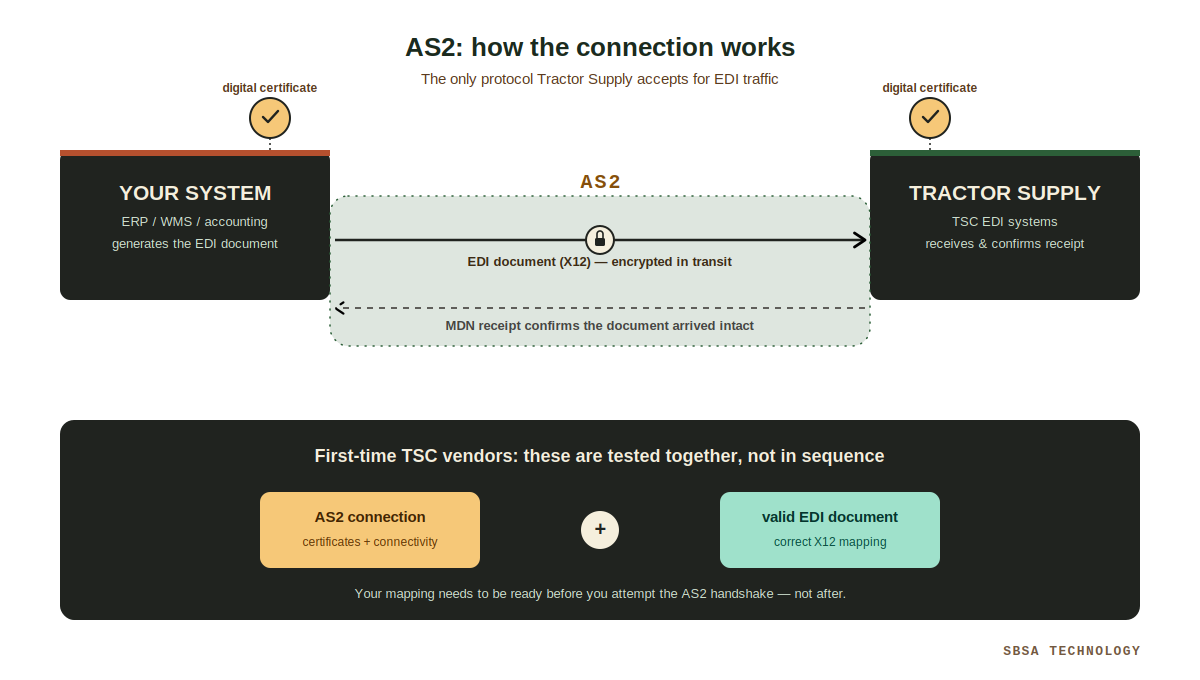
Tractor Supply mandates AS2 (Applicability Statement 2) as its connection protocol for every EDI transaction — it isn't one option among several. AS2 secures documents in transit with encryption and digital certificates, and it uses Message Disposition Notifications (MDNs) so both sides can confirm a document actually arrived intact.
One detail that catches first-time TSC vendors off guard: TSC expects a valid, correctly formatted EDI document even during initial AS2 connectivity testing. The connection layer and the document layer get tested together, not one after the other in isolation — so your mapping needs to be in reasonably good shape before you even attempt the AS2 handshake.
Standing up a compliant AS2 connection alongside correct X12 mapping is usually smoother with an established EDI provider than building it from scratch in-house.
Which EDI Format Does Tractor Supply Use?
Tractor Supply's EDI program follows ANSI X12 guidelines, built on the X12 4010 standard adopted across much of the retail industry and approved by the American National Standards Institute. Whatever system generates your internal orders, invoices, and shipment records, the goal is the same: structured data that both your system and TSC's system interpret identically, with no ambiguity.
The Two Building Blocks of EDI: Translation and Transmission
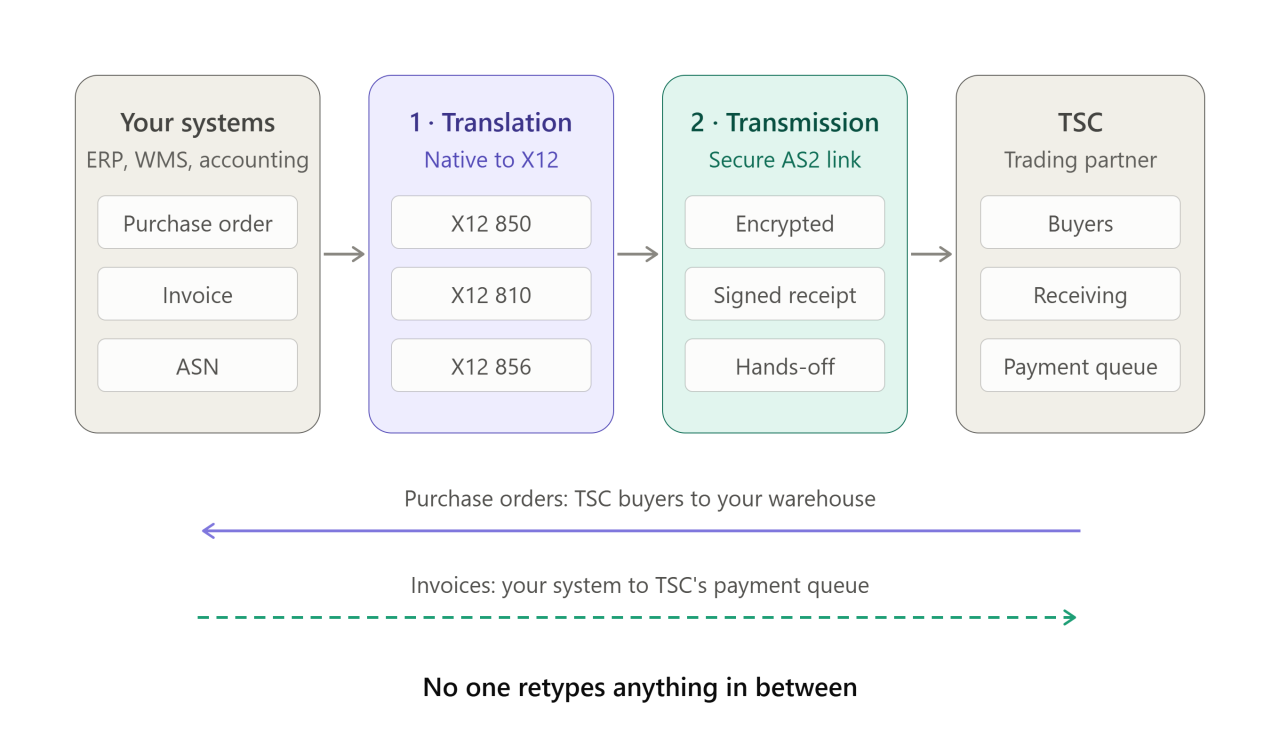
Translation comes first. Your ERP, WMS, or accounting system's native purchase order, invoice, or ASN gets converted into the standardized X12 document TSC's systems expect — regardless of what software produced the original.
Transmission comes next. That translated document is sent to TSC securely over AS2, landing without anyone needing to manually intervene.
Together, these two steps are what let purchase orders move from TSC's buyers to your warehouse — and invoices move from your system to TSC's payment queue — without a person retyping anything in between.
Step-by-Step: Becoming an EDI-Ready Tractor Supply Vendor
TSC doesn't require a specific EDI software vendor, but onboarding follows a defined sequence:
1. Complete vendor registration. New vendors typically apply through TSC's SupplierOne platform or a RangeMe submission, or are selected during one of TSC's Open Buying Days (held three times a year in Franklin, Tennessee).
2. Execute the Vendor Agreement and Vendor Requirements Manual. Once a buyer selects your products, TSC issues a Vendor Agreement and the Vendor Requirements Manual (VRM), which spells out EDI, packaging, labeling, and routing obligations. The accompanying Vendor Setup Schedule must be completed in full and signed by a company officer — an incomplete field can stall the entire setup process.
3. Confirm you're EDI-capable. Every core document exchanged with TSC — POs, ASNs, invoices — must move electronically. There's no ongoing manual fallback. You need the ability to generate, transmit, and receive these documents automatically over a stable AS2 connection before a vendor number is finalized.
4. Set up your AS2 environment. Configure your AS2 software and gather the connection details TSC's EDI team will need: your AS2 identifier, IP address, and digital certificates.
5. Register through the TSC Transaction Portal. This is where your EDI connectivity is provisioned and where you'll track compliance metrics — on-time delivery, inventory accuracy, and document accuracy — once you're live.
6. Test your connection and document set. TSC expects both the AS2 handshake and a correctly formatted EDI document to work together during testing, not just the connectivity layer. Vendors must be fully EDI-tested and compliant within 60 days of onboarding.
7. Meet the 48-hour PO acknowledgment window. Once live, purchase orders must be acknowledged within 48 hours. All electronic documents are considered official and supersede any faxed or hard-copy version — so a missed 855 isn't just a formality, it can hold up the order.
The EDI Documents You'll Actually Use
TSC expects a complete document suite, not just the purchase order. The core set includes:
- 850 — Purchase Order: The electronic PO in X12 format, covering products, quantities, pricing, and routing.
- 855 — Purchase Order Acknowledgment: Required for every PO. TSC expects a full accept or full reject — partial acceptances aren't supported.
- 856 — Advance Ship Notice (ASN): Must match the 850 line for line, including carrier and tracking detail, sent ahead of the shipment.
- 810 — Invoice: Submitted only for completed, shipped orders — never for canceled ones.
- 860 — Purchase Order Change: Communicates PO changes or cancellations. Processing these promptly matters — shipping against a canceled PO creates its own chargeback risk.
- 846 — Inventory Advice: Daily (Monday–Friday) stock status updates, required in EDI format rather than CSV or XML for vendors on relevant programs.
- 997 — Functional Acknowledgment: Confirms a transmitted document was received and structurally valid.
Depending on your vendor program, you may also need the 820 (payment/remittance), 812 (credit/debit adjustment), 864 (text message), or 180 — your buyer or EDI contact can confirm which apply.
Fulfillment Models Change What EDI You Need
Tractor Supply runs several distinct fulfillment paths, and the transaction set that matters most to you depends on which one you're in:
- DC (Distribution Center): Goods ship to a TSC distribution center for redistribution to stores — the standard model for most vendors.
- DTS (Direct to Store): Merchandise ships directly from the supplier to individual TSC store locations, bypassing the DC.
- DSV (Drop Ship Vendor): You ship directly to the TSC customer on the retailer's behalf. No inventory sits at a TSC DC, and EDI capability is a prerequisite for program approval — not something you can phase in after launch.
- Cross-dock: Goods move through a DC with minimal dwell time before redistribution.
Each model leans on the same core document set, but the volume, frequency, and stakes of ASNs and inventory advices shift depending on which one applies to your products.
Choosing the Right EDI Translation Approach
Whatever tool sits behind your EDI program, its job is unchanged: take your internal data and reliably convert it into the X12 structure TSC expects, and translate what comes back the other direction. The quality of that mapping is what determines whether your POs, ASNs, and invoices move cleanly through TSC's systems — or generate chargebacks and delayed payments once you're live.
How SBSA Technology Can Help
Standing up a compliant AS2 connection, getting your X12 mapping right on the first pass, and hitting TSC's 60-day testing window and 48-hour acknowledgment requirement isn't trivial — and getting any piece wrong costs you time during onboarding or, worse, delays getting paid once orders start flowing. SBSA Technology helps suppliers plan, configure, and validate their Tractor Supply EDI integration from the AS2 handshake through document testing, so your team isn't troubleshooting connectivity issues against TSC's clock.
Frequently Asked Questions
Does Tractor Supply require EDI from every vendor? Yes. EDI capability is addressed in the Vendor Agreement and Vendor Requirements Manual before a vendor number is issued, and there's no ongoing manual alternative once you're live.
Which EDI documents matter most? The core set is the 850 (PO), 855 (PO acknowledgment), 856 (ASN), 810 (invoice), 860 (PO change), 846 (inventory advice), and 997 (functional acknowledgment). Your program may also call for the 820, 812, or 864.
How long does EDI testing take? TSC expects vendors to be fully tested and compliant within 60 days of onboarding.
How fast do I need to acknowledge a purchase order? Within 48 hours of receipt, via the EDI 855.
Do I need a specific EDI software product? No — TSC doesn't mandate a particular vendor. You need a solution that produces valid X12 documents and connects over AS2.
Conclusion
Tractor Supply's EDI requirements aren't a box to check during onboarding — they're the operational backbone your entire vendor relationship runs on afterward. Get the AS2 connection, document mapping, and 48-hour acknowledgment process right before that first 850 arrives, and the day-to-day flow of orders, shipments, and invoices becomes largely automatic. Treat it as an afterthought, and you'll be troubleshooting connectivity issues right when you're trying to get your first shipment out the door.
Connect with SBSA Technology
Ready to get EDI-compliant with Tractor Supply — or want a second opinion on your current setup? SBSA Technology works with retail suppliers, distributors, and 3PL providers to automate EDI, order processing, and retailer compliance.
- Book a demo: sbsatech.com/consultancy
- Talk to the team: sbsatech.com/contact
- Explore the platform: sbsatech.com
- More insights: sbsatech.com/blog