
For retail vendors, Electronic Data Interchange (EDI) is more than a system for exchanging electronic documents. It is a critical part of daily operations.
Retail purchase orders must be received and processed correctly. Shipments must leave on schedule. Advance Ship Notices (ASNs) must match actual shipments, and invoices must meet each retailer's requirements.
When these processes depend on an existing EDI provider, changing systems can feel risky.
What happens if purchase orders stop arriving? Could a shipment be delayed because an ASN fails? Will invoices be sent twice? Could a retailer flag the vendor for noncompliance during the transition?
These are reasonable concerns, especially for suppliers working with major retailers such as Walmart, Costco, Target, Home Depot, and other trading partners with specific EDI requirements.
However, switching EDI providers does not automatically mean disrupting business operations. With a documented migration plan, coordinated testing, clear responsibilities, and a controlled go-live process, vendors can reduce the risk of downtime and transaction errors.
The objective is simple: transition the EDI infrastructure without losing control of orders, shipments, inventory, or invoicing.
In this guide, we explain how retail vendors can evaluate their existing EDI environment, prepare for migration, test the new setup, and transition to a new provider while protecting day-to-day operations.
Why Retail Vendors Consider Switching EDI Providers
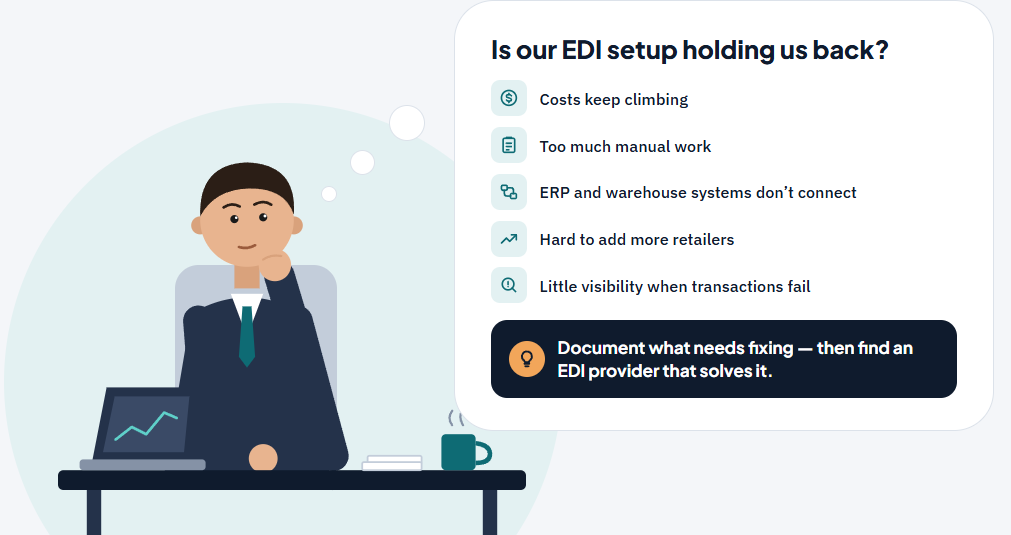
Businesses rarely evaluate a new EDI provider without a reason. As order volumes increase and retail relationships become more complex, an existing setup may no longer meet operational or financial needs.
Common reasons include:
1. Rising EDI Costs
EDI expenses can include recurring subscription fees, implementation charges, trading-partner fees, transaction fees, custom integration work, and support costs.
Vendors should evaluate the complete cost of their current arrangement rather than comparing subscription prices alone.
2. Too Much Manual Work
Some businesses still rely on employees to transfer purchase order information into accounting or ERP systems, check shipment details, generate invoices, or reconcile inventory across disconnected platforms.
A provider that transmits EDI documents but does not adequately automate internal workflows may leave substantial work for the operations team.
3. Limited ERP or Warehouse Integration
Retail vendors may need EDI to work directly with systems such as QuickBooks, NetSuite, Fishbowl, or their warehouse management system.
If information does not flow reliably between EDI, accounting, inventory, and fulfillment systems, employees may have to reconcile multiple sources of data.
4. Difficulty Scaling to More Retailers
Adding new trading partners can introduce additional transaction requirements, testing procedures, shipping rules, and compliance obligations.
Vendors need an EDI setup that can support their growth without creating unnecessary administrative work.
5. Support and Visibility Challenges
When a transaction fails, the operations team needs to identify the problem, understand its impact, and resolve it quickly.
Limited transaction visibility or unclear support responsibilities can make problems harder to resolve.
Before making a change, document the specific problems you want the new provider to solve. This will help you measure whether the migration delivers meaningful improvements.
Illustrative Case Study: Planning an EDI Migration Without Interrupting Retail Fulfillment
The following scenario is illustrative and is not a claim about a specific SBSA Technology customer.
The Situation
Consider a growing retail supplier that sells products to several major retailers and uses an existing EDI provider to manage purchase orders, shipping documents, and invoices.
The company also operates an ERP system and warehouse workflow that must remain synchronized with its retailer transactions.
Over time, the business identifies several challenges:
-
Increasing EDI and integration costs.
-
Manual intervention between incoming purchase orders and internal order processing.
-
Repeated reconciliation of shipment and invoice information.
-
Limited visibility into transaction exceptions.
-
Concern that changing providers could disrupt active retailer orders.
Management begins evaluating alternatives but does not want to jeopardize existing retailer relationships or delay shipments.
The Main Challenge
The company cannot simply disconnect its existing EDI service and activate a replacement without preparing for the transition.
Its current workflows may include active purchase orders, pending acknowledgments, shipments awaiting ASNs, and invoices that have not yet been transmitted or accepted.
The migration must also account for retailer-specific requirements, communication methods, document mappings, and certification or testing obligations.
The Migration Objective
The company establishes five priorities:
-
Preserve continuity for active orders and shipments.
-
Maintain accurate inventory and order information.
-
Prevent duplicate or missing transactions.
-
Validate the new EDI connection before production use.
-
Transition with clear ownership of outstanding transactions and exceptions.
These priorities become the basis of the migration plan.
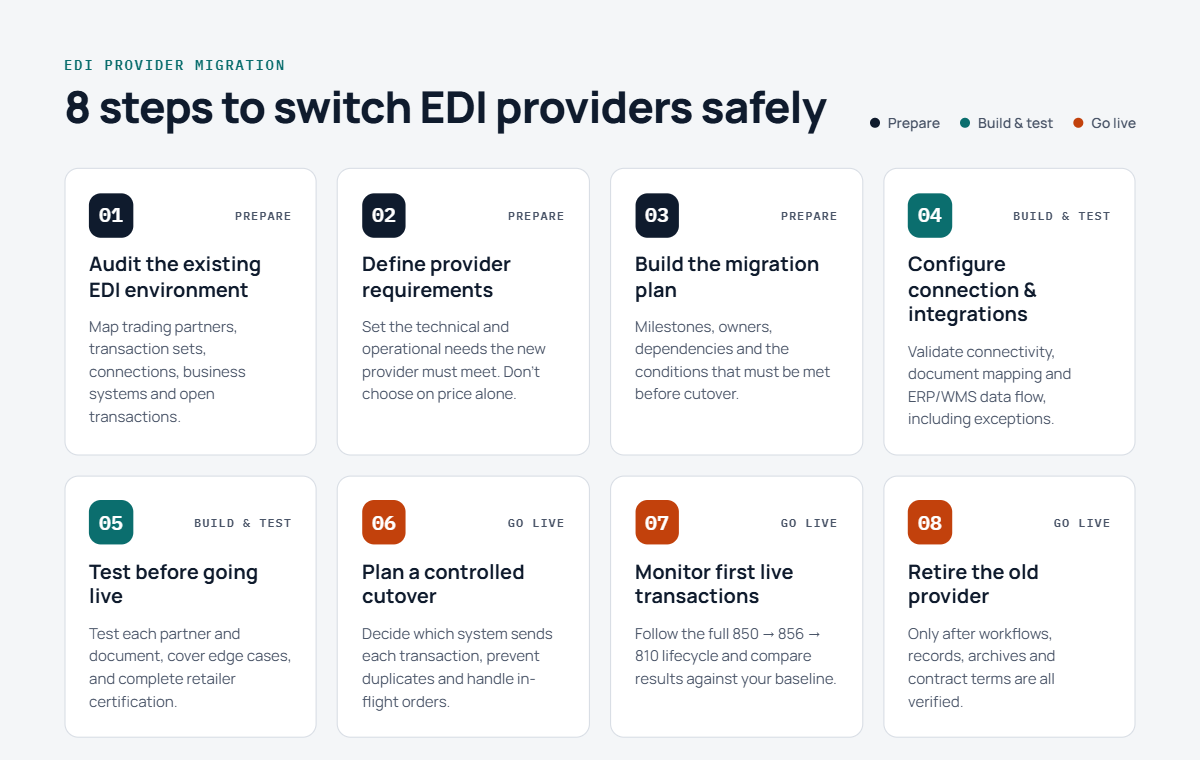
Step 1: Audit the Existing EDI Environment
Before configuring the replacement system, document how the current environment operates.
What to Review
Trading partners: List every retailer, distributor, marketplace, and other partner that exchanges EDI documents with your business.
Transaction sets: Identify the documents used by each partner, including:
-
EDI 850 — Purchase Order
-
EDI 855 — Purchase Order Acknowledgment
-
EDI 856 — Advance Ship Notice
-
EDI 810 — Invoice
-
EDI 846 — Inventory Inquiry/Advice, where applicable
-
EDI 860 — Purchase Order Change Request, where applicable
-
EDI 997 or EDI 999 — Functional Acknowledgment, depending on requirements
Not every retailer requires every transaction. Confirm the applicable document set and implementation guide for each trading partner.
Communication methods: Document whether connections use AS2, SFTP, a Value-Added Network (VAN), APIs, or another approved method.
Business systems: Record how EDI connects to your ERP, accounting software, warehouse system, shipping tools, and inventory processes.
Outstanding transactions: Identify open purchase orders, unacknowledged orders, pending shipments, transmitted invoices, rejected documents, and transactions awaiting confirmation.
Operational ownership: Determine who monitors transactions, resolves errors, contacts retailers, and approves changes.
Step 2: Define What the New EDI Provider Must Deliver
Do not select a replacement based on price alone.
Use the audit to establish the technical and operational requirements the new provider must meet.
Your evaluation should cover:
-
Support for every required trading partner and transaction set.
-
Retailer-specific mapping and compliance requirements.
-
Connectivity options and security requirements.
-
Integration with existing ERP, accounting, and warehouse systems.
-
Order processing, shipment, inventory, and invoicing workflows.
-
Transaction monitoring, error alerts, and troubleshooting.
-
Implementation responsibilities and support availability.
-
Total implementation and ongoing operating costs.
Ask the provider to explain how it will handle your actual workflows, including exceptions and failed transactions.
For example, if an incoming EDI 850 contains an unknown SKU, determine whether the system will reject the order, flag it for review, or handle it through a configured exception process.
The goal is to select a solution that addresses the underlying operational problems rather than merely moving the same manual work to another platform.
Step 3: Build a Migration Plan With Clear Responsibilities
Once the new provider is selected, create a migration plan with milestones, owners, dependencies, and approval criteria.
A typical plan includes:
-
Current-state assessment.
-
Trading-partner and document mapping.
-
ERP/WMS integration configuration.
-
Connectivity setup.
-
Test transaction preparation.
-
Retailer testing or certification, where required.
-
Production cutover planning.
-
Post-launch monitoring and issue resolution.
Assign responsibilities to your internal operations team, IT or integration personnel, the outgoing provider, the incoming provider, and retailer contacts where necessary.
Agree on how open transactions will be handled, who can authorize production changes, and what conditions must be met before cutover.
Important: Do not terminate the existing service solely because the replacement configuration is complete. Confirm that required testing, data access, transition support, and outstanding transaction handling are covered first.
Step 4: Configure the New EDI Connection and Business-System Integrations
The replacement provider must be configured to handle the required document flows and internal business processes.
Validate the EDI Connection
Confirm the correct communication method, partner identifiers, authentication credentials, certificates, routing settings, and acknowledgments.
Where applicable, coordinate certificate changes and connectivity testing with the retailer or network provider.
Validate Document Mapping
Check that incoming and outgoing documents contain the required fields and use the correct values for the trading partner.
Important data may include:
-
Retailer and supplier identifiers.
-
Purchase order numbers.
-
Item numbers and UPCs.
-
Quantities and unit-of-measure values.
-
Pricing and allowances.
-
Ship-to and bill-to addresses.
-
Shipment dates and tracking information.
-
Invoice totals and references.
Validate ERP/WMS Integration
If the business uses QuickBooks, NetSuite, Fishbowl, or another supported platform, test the movement of data between EDI and the internal system.
Confirm that purchase orders create the expected records, shipment information updates the correct orders, inventory remains consistent, and invoices reference the correct transactions.
Also test exception handling. A successful integration must do more than process the ideal transaction; it must help staff identify and resolve incorrect or incomplete data.
Step 5: Test Before Moving Live Transactions
Testing is one of the most important controls in an EDI migration.
A connection that appears technically functional may still produce incorrect business documents or fail retailer-specific validation.
Create a test plan for each trading partner and relevant transaction set.
Example EDI Migration Test Matrix
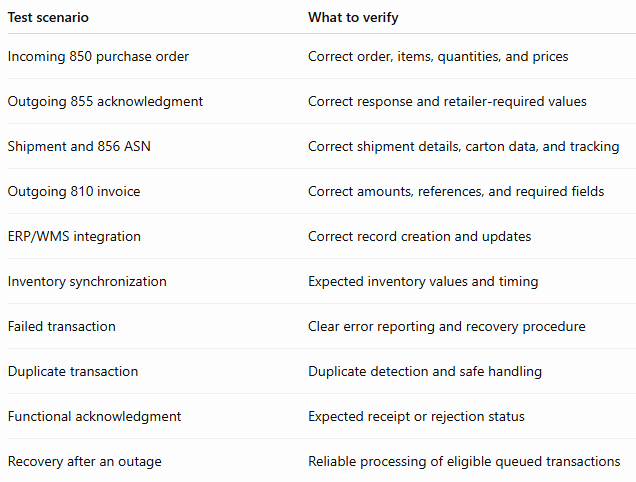
Use retailer-approved test environments and follow the applicable certification procedures.
Where possible, test representative edge cases such as invalid item numbers, partial shipments, order changes, and missing required data.
Document the results and obtain the necessary approvals before enabling production transactions.
Step 6: Plan a Controlled Cutover
Once testing is complete, establish a cutover plan that identifies exactly when transaction routing will change.
Prepare for Cutover
Before the agreed transition time:
-
Confirm that required testing has passed.
-
Identify open orders and transactions still being processed by the outgoing provider.
-
Agree on which system will own each transaction during the transition.
-
Confirm access to historical documents and transaction records.
-
Validate the new provider's production configuration.
-
Establish escalation contacts and monitoring responsibilities.
-
Confirm how the old connection will be retired after the transition.
Avoid Duplicate Processing
One important risk is sending the same business transaction through both providers.
For example, if two systems independently process the same shipment, the retailer may receive duplicate ASNs or invoices.
Use a controlled routing plan and transaction-level reconciliation. Do not assume that running both systems simultaneously is safe without defined rules.
The cutover plan should specify which system is authorized to send each production transaction, how duplicates will be prevented, and how transactions already in flight will be completed.
Maintain Operational Visibility
During the transition, monitor incoming purchase orders, acknowledgments, shipment notices, invoices, and relevant functional acknowledgments.
Compare the new system's records with the retailer's and internal systems' expected results.
If a critical issue occurs, follow a predefined escalation and recovery procedure rather than making uncoordinated configuration changes.
Step 7: Monitor the First Production Transactions
The migration is not complete simply because the first document is transmitted successfully.
Monitor the complete transaction lifecycle after go-live.
For example:
-
The retailer sends an EDI 850 purchase order.
-
The order reaches the intended system.
-
The supplier processes and acknowledges the order as required.
-
The warehouse fulfills the order.
-
The shipment details and EDI 856 ASN are transmitted correctly.
-
The EDI 810 invoice is generated and sent at the appropriate stage.
-
Relevant acknowledgments and retailer responses are reviewed.
-
Exceptions are investigated and resolved.
Monitor the same processes for each affected trading partner, taking into account that document requirements and workflows may differ.
Compare post-migration performance against the baseline established during the audit.
Useful measures include transaction acceptance rates, processing time, order exceptions, duplicate transactions, unresolved errors, shipment delays, and invoice discrepancies.
Do not declare success based only on a working connection. Confirm that the business process is functioning as expected.
Step 8: Retire the Old Provider Only After Verification
After the new EDI environment is stable, complete the formal transition away from the previous provider.
Before decommissioning the old service, verify that:
-
Required production workflows are operating correctly.
-
Outstanding transactions have been accounted for.
-
Historical EDI documents and reports are accessible or archived.
-
Necessary mappings and configuration records are retained.
-
Support and escalation procedures are working.
-
The business has confirmed that the old connection is no longer needed.
-
Contractual notice, data-export, retention, and termination requirements have been addressed.
Coordinate the final shutdown with the relevant providers and internal stakeholders.
Retaining the old service temporarily may be appropriate when the contract, retailer requirements, technical dependencies, and risk controls permit it. However, overlapping services should have clearly defined responsibilities and should not independently transmit the same production transactions.
Illustrative Outcome: What a Successful Migration Should Achieve
This section describes intended outcomes, not measured results from a verified customer engagement.
With a structured migration process, the illustrative supplier aims to achieve:
-
Continuity of critical retailer order and fulfillment workflows.
-
Accurate processing of required EDI documents.
-
Reduced risk of missing or duplicate transactions.
-
Reliable integration between EDI and internal business systems.
-
Clearer visibility into transaction status and exceptions.
-
A documented process for support and recovery.
-
A foundation for improving automation and operational efficiency.
Actual outcomes depend on the retailer requirements, existing systems, transaction complexity, testing results, implementation scope, and the coordination of everyone involved.
The most important measure of success is whether the business can continue processing orders and shipments reliably while gaining the improvements that justified the migration.
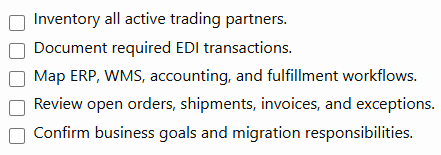
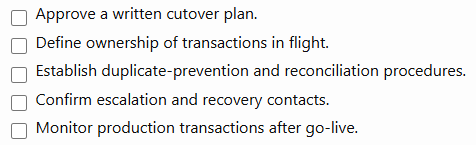
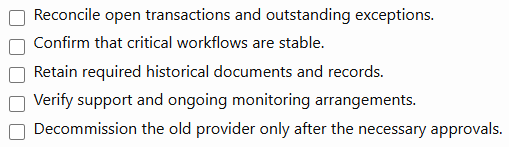
EDI Migration Checklist for Retail Vendors
Use this checklist before approving a provider transition.
Assessment and Planning
Configuration and Testing
Final Transition
How SBSA Technology Can Help Retail Vendors Plan Their EDI Transition
Switching EDI providers is an opportunity to evaluate more than document transmission. It is a chance to review how retailer orders, internal systems, warehouse operations, inventory, shipments, and invoices work together.
SBSA Technology helps retail vendors evaluate EDI and integration workflows with an emphasis on retail operations and business-system connectivity.
Depending on the agreed scope and supported integrations, an implementation may include:
-
Retail EDI transaction processing.
-
Trading-partner connectivity and document mapping.
-
ERP and warehouse-system integration.
-
Automated order processing and shipment workflows.
-
ASN, invoice, and inventory data flows.
-
Transaction monitoring and exception handling.
-
Migration planning, testing, and production transition support.
Every migration is different. Retailer requirements, existing provider arrangements, integrations, and testing obligations must be reviewed before a transition plan is finalized.
If you currently use SPS Commerce, TrueCommerce, or another EDI provider and are evaluating alternatives, SBSA Technology can help you review your current workflow, identify integration requirements, and discuss an appropriate transition approach.
You should not have to choose between improving your EDI operations and protecting your existing retailer relationships.
Frequently Asked Questions
Can I switch EDI providers without stopping shipments?
A planned transition can reduce the risk of shipment disruption, but uninterrupted operations cannot be guaranteed in every situation. The outcome depends on testing, retailer requirements, transaction routing, system dependencies, and cutover execution.
How long does it take to switch EDI providers?
The timeline depends on the number of trading partners, required transactions, ERP/WMS integrations, retailer testing requirements, and the complexity of the existing environment. Establish a project schedule after completing the initial assessment rather than relying on a universal timeline.
Will I need to reconnect with every retailer?
Not necessarily in the same way for every partner. Some configurations, identifiers, network arrangements, or certifications may need to be established or updated. Confirm each retailer's requirements with the incoming provider and the relevant retailer or network contact.
Can I keep my existing ERP or accounting software?
In many cases, the objective is to connect the new EDI solution to existing systems rather than replace them. However, compatibility, integration scope, data mappings, and any required changes must be confirmed before implementation.
Should both EDI providers run at the same time?
A temporary overlap may be useful for specific migration activities, but it requires careful controls. Define which system handles each transaction, prevent duplicate production transmissions, and coordinate the cutover. Running both providers independently on live traffic can create inconsistencies.
What happens to open purchase orders and pending invoices?
They should be inventoried and assigned a clear processing path before cutover. The migration team must establish how open orders, acknowledgments, shipments, invoices, and unresolved exceptions will be completed and reconciled.
How can I reduce the risk of retailer chargebacks during migration?
Validate retailer-specific document requirements, shipping labels, ASN data, item identifiers, quantities, and invoice information. Monitor the first production transactions closely and resolve exceptions promptly.
Is switching EDI providers a good time to automate manual work?
It can be a good opportunity to review manual steps and integration gaps. Prioritize improvements that fit the migration scope and can be properly tested. Avoid introducing unnecessary changes to critical workflows immediately before go-live.
Ready to Evaluate Your EDI Setup?
Contact SBSA Technology to discuss your current EDI environment, integration requirements, and migration goals.
- Book a demo: sbsatech.com/consultancy
- Talk to the team: sbsatech.com/contact
- Explore the platform: sbsatech.com
- More insights: sbsatech.com/blog