
A warehouse operator processes a retailer order directly inside their WMS — no manual re-entry required with native EDI integration.

Every time a purchase order arrives from Walmart, Costco, or Amazon, someone on your team has to do something with it. In too many supplier operations, that means opening two systems — your EDI platform and your ERP or WMS — and manually moving data between them. Order number, line items, quantities, ship-to address: copied, pasted, checked, re-checked.
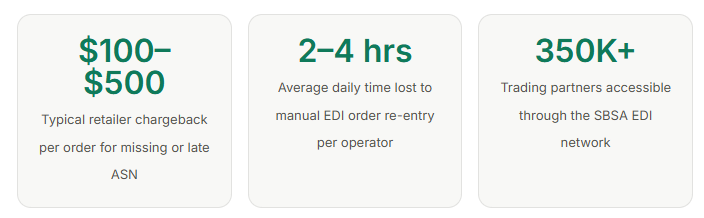
Multiply that by 50 orders a day. Then add the risk of a typo triggering a chargeback. Then remember that the ASN and invoice also have to go back to the retailer after you ship — and if those are late or missing, the chargeback penalty arrives regardless of whether the shipment was perfect.
This is the operational gap that native EDI integration with your ERP and WMS is designed to close.
What "Native EDI Integrations" actually means
The term gets used loosely, so it is worth being precise. Native EDI integration means that your ERP or WMS system is directly connected to your EDI provider — so that retailer orders appear inside QuickBooks, NetSuite, Microsoft Dynamics 365, Fishbowl, or Extensiv automatically, as native records, without any manual import or data transfer.
It also means the reverse: when your team generates a shipping label inside your existing software, the EDI provider automatically triggers the outbound EDI files — the EDI 856 Advance Ship Notice and the EDI 810 Invoice — and transmits them to the retailer. Your operators do not need to open a second screen, log into an EDI portal, or take any additional action.

This is fundamentally different from a basic EDI connection, where orders arrive in an EDI portal and someone still has to manually move them into the ERP. That approach solves the data format problem but does nothing to eliminate the double-entry problem.
The hidden cost of disconnected systems
Most suppliers underestimate the operational cost of running EDI and ERP as separate systems. The obvious cost is time — operators spending hours a day on data entry that should be automatic. But the less visible cost is errors and omissions that trigger retailer chargebacks.
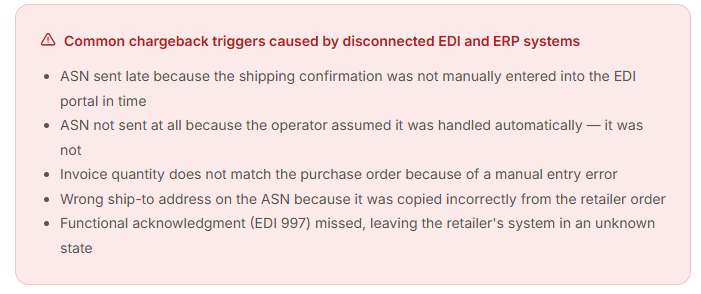
Each of these is preventable with a fully integrated system. None of them can occur when the EDI layer and the ERP are connected natively — because there is no manual step where the error can be introduced.
Which ERP and WMS systems support native EDI integration?
The answer depends on your EDI provider. Standard EDI connectivity — where your provider receives orders and stores them in an EDI portal — works with almost any ERP or WMS. But native integration, where orders push directly into your system and outbound files trigger automatically, requires purpose-built connectors for each platform.
SBSA Technology's Native ERP & WMS Operations product currently supports direct integration with:
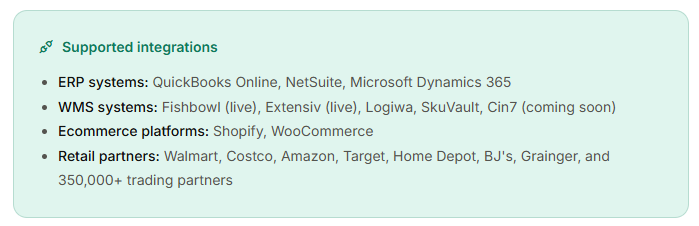
For businesses using Fishbowl or Extensiv, the integration is live and in production today. For Logiwa, SkuVault, and Cin7 users, native connectors are in active development.
How the integration works end to end
1. Retailer sends an EDI 850 purchase order
SBSA receives the order via AS2, SFTP, or VAN from the retailer and validates it against the retailer's current EDI specifications.
2. Order is pushed into your ERP or WMS automatically
The validated order is translated from EDI X12 format and created as a native sales order inside QuickBooks, NetSuite, Fishbowl, or your connected platform — no action required from your team.
3. Your operator picks, packs, and ships as normal
Your team works entirely inside their existing software. Nothing changes about their workflow. When they generate a shipping label, that action is the trigger.
4. SBSA automatically sends the ASN and invoice to the retailer
The EDI 856 Advance Ship Notice and EDI 810 Invoice are generated from your shipping data and transmitted to the retailer within seconds — fully formatted to their specification, on time, every time.
Why the EDI portal still matters even with full automation
Even when inbound and outbound EDI is fully automated, you still need visibility into what is happening. Did the ASN actually reach Walmart? Is there a pending invoice for an order that shipped three days ago? Is there a missing EDI file that is about to trigger a chargeback?
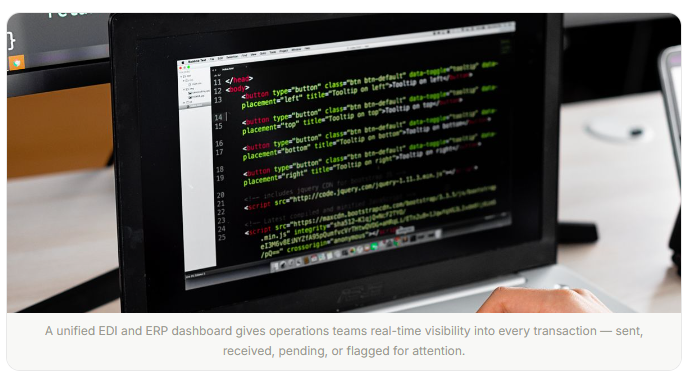
This is where the SBSA portal comes in. Every EDI transaction — inbound and outbound, across every retail partner — is logged in real time and searchable by order number. The portal shows the exact status of every file: sent, received, pending, or flagged for attention. Missing files are detected automatically and surfaced before the retailer notices them.
All EDI records are stored for five years, fully searchable, and audit-ready at any time. Retention can be extended based on your compliance requirements.
Is native EDI integration right for your operation?
If your business sells to one or more major retailers and currently manages EDI and your ERP or WMS as separate systems, native integration will almost certainly save time and reduce chargebacks. The clearest signal is this: if anyone on your team is manually copying order data between two systems, that process should not exist.
Implementation typically takes 3 to 14 business days. A dedicated SBSA account manager handles the full setup — API connections, EDI mapping, trading partner configuration, and team training. No internal IT resources are required.