
Retail vendors depend on accurate shipment information to meet retailer requirements, avoid receiving delays, and keep orders moving through the supply chain. One of the most important documents in this process is the EDI 856 Advance Ship Notice (ASN).
When an ASN contains incorrect information, arrives outside the required time window, or does not match the physical shipment, retailers may experience receiving problems and issue compliance chargebacks according to their vendor policies.
Unfortunately, an ASN can be transmitted successfully and still contain errors that create problems for the retailer.
For manufacturers, distributors, wholesalers, and consumer product vendors, understanding how to troubleshoot these errors is essential to maintaining reliable retail operations.
In this guide, SBSA Technology explains 10 common EDI 856 ASN errors, why they occur, how to correct them, and what businesses can do to prevent recurring problems.
What Is an EDI 856 ASN?
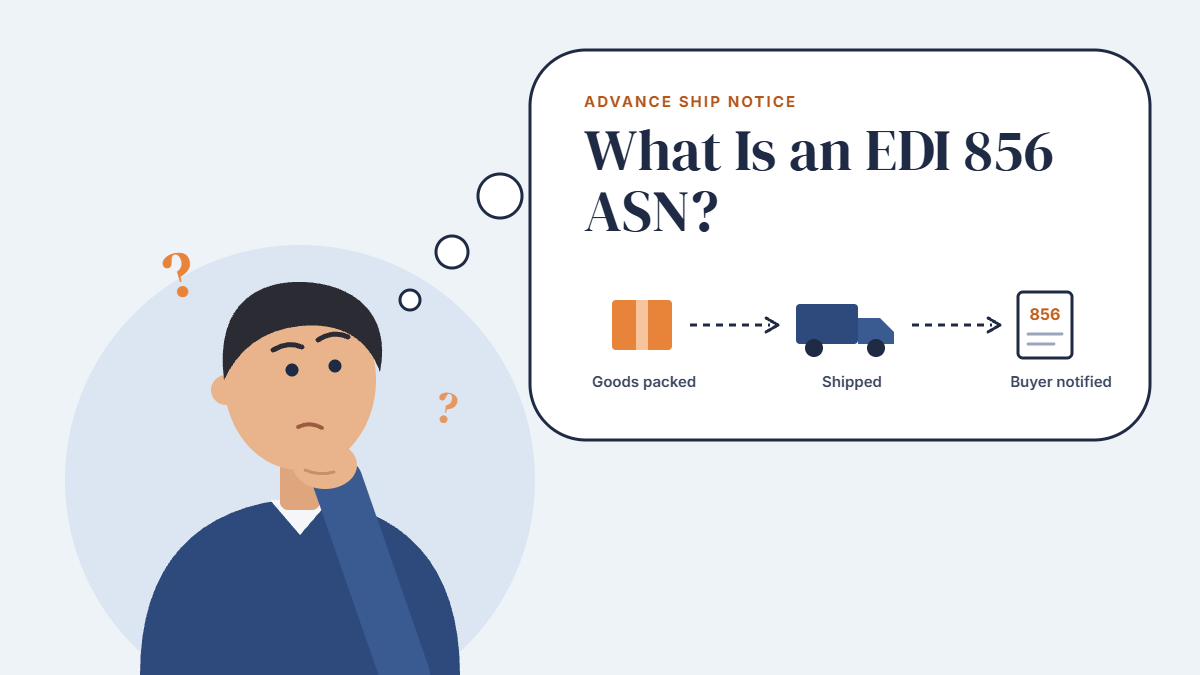
The EDI 856 Advance Ship Notice is an electronic transaction that communicates shipment details to a retailer or trading partner before the shipment arrives, according to the partner's requirements.
It can contain information about the shipment, purchase order, cartons, products, shipped quantities, and other details required by the receiving organization.
The EDI 856 helps retailers prepare for incoming shipments, identify cartons, reconcile shipment contents, and coordinate receiving activities.
A typical retail EDI workflow includes:
-
EDI 850 — Purchase Order: The retailer sends the vendor a purchase order.
-
EDI 855 — Purchase Order Acknowledgment: The vendor responds to the purchase order when required.
-
Warehouse Fulfillment: The vendor picks, packs, labels, and prepares the order for shipment.
-
EDI 856 — Advance Ship Notice: The vendor sends shipment information to the retailer.
-
EDI 810 — Invoice: The vendor submits the invoice according to the retailer's requirements.
The EDI 856 is especially important because it connects the vendor's shipment records with the retailer's receiving process.
However, successful transmission does not automatically mean that an ASN is accurate, compliant, or accepted by the retailer's business systems.
Why Do EDI 856 Errors Cause Retail Compliance Problems?
Retailers establish specific requirements for ASN content, timing, carton identification, shipment hierarchy, and labeling. These requirements may differ between trading partners.
If a shipment's electronic information does not match the physical goods, the retailer may need to investigate discrepancies, manually identify cartons, or delay receiving activities.
Depending on the retailer's compliance program, these issues can result in chargebacks or other penalties.
Common causes include:
-
Manual data entry between ERP, warehouse, and EDI systems
-
Incorrect purchase order or item information
-
Shipment quantities that do not match actual packed goods
-
Carton labels that do not match ASN identifiers
-
Incorrect shipment or carton hierarchy
-
Missing retailer-required information
-
Late transmission or repeated transactions
-
Insufficient validation before the ASN is sent
Not every ASN error results in a chargeback. The outcome depends on the retailer's requirements, the type of error, and the applicable vendor agreement.
The key is to identify problems before they reach the retailer whenever possible.
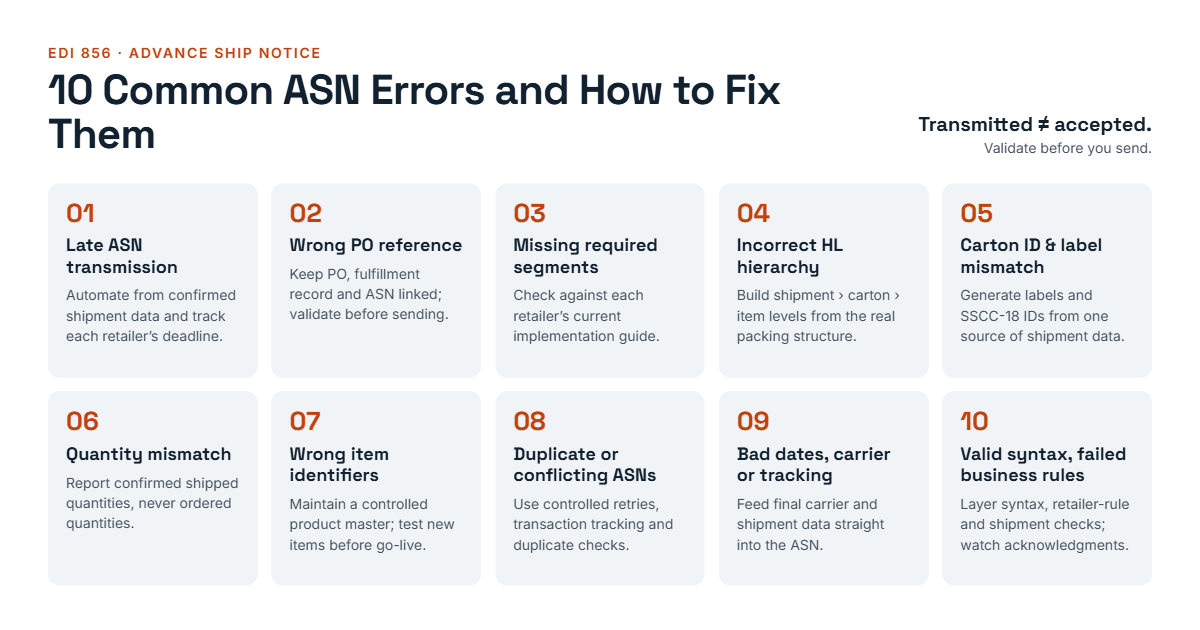
10 Common EDI 856 ASN Errors and How to Fix Them
 1. Late ASN Transmission
The problem
The ASN reaches the retailer after the required submission deadline or does not arrive within the retailer's specified window relative to shipment.
Even if the shipment leaves the warehouse on time, late ASN transmission can create receiving and compliance issues.
Common causes
-
ASN generation depends on manual employee action.
-
Warehouse shipment confirmations are delayed.
-
EDI processing queues or communication failures interrupt transmission.
-
Teams misunderstand the retailer's ASN timing requirements.
-
Shipment data is not available when the ASN must be generated.
How to troubleshoot it
-
Confirm the retailer's exact ASN submission deadline.
-
Compare the actual shipment event, ASN creation time, and transmission time.
-
Review EDI processing logs and available acknowledgment records.
-
Identify whether the delay originated in the warehouse, ERP, EDI platform, or communication connection.
-
Establish alerts for shipments approaching the required deadline.
How to prevent it
Automate ASN generation from confirmed shipment data when supported, and monitor transmission status against retailer-specific deadlines.
Do not assume that every retailer uses the same timing rule. Requirements should be configured for each trading partner.
2. Incorrect Purchase Order Reference
The problem
The ASN references the wrong purchase order or contains an incorrect or missing order identifier.
This can prevent the retailer from matching the shipment to the expected order.
Common causes
-
Employees select the wrong purchase order.
-
Purchase order references are mapped incorrectly between systems.
-
Shipment records contain outdated order information.
-
A manual correction is made in one system but not another.
How to troubleshoot it
-
Compare the purchase order reference in the ASN with the retailer's original EDI 850.
-
Verify the reference against the warehouse shipment record.
-
Check the applicable EDI mapping and field transformations.
-
Correct the source data and regenerate the ASN if required.
-
Confirm that the corrected transaction is processed according to the retailer's resubmission procedures.
How to prevent it
Maintain a consistent link between the purchase order, fulfillment record, and ASN throughout the order lifecycle.
Automated validation can flag missing or inconsistent purchase order references before transmission.
3. Missing Required Segments or Data Elements
The problem
The ASN omits information required by the retailer's implementation guide.
Depending on the trading partner, this could involve shipment dates, identifiers, carrier information, item details, quantities, or other required elements.
An ASN may be structurally valid EDI but still fail retailer-specific business validation.
Common causes
-
An EDI mapping does not include a required field.
-
Source systems do not provide the necessary data.
-
Retailer requirements have changed.
-
A generic EDI configuration is used for a partner with different requirements.
-
Optional fields under the general EDI standard are mandatory under the retailer's implementation guide.
How to troubleshoot it
-
Obtain the current retailer-specific EDI 856 implementation guide.
-
Review the retailer's rejection message or compliance report.
-
Identify the missing segment or data element.
-
Trace the missing value to its source system.
-
Correct the mapping or source data and retest the transaction.
How to prevent it
Maintain separate, documented validation rules for each retailer where necessary. Test configuration changes before deploying them to production.
A syntax check alone is not enough; business-rule validation is also important.
4. Incorrect Shipment, Carton, or Item Hierarchy
The problem
The ASN does not accurately represent the relationships between shipment, order, packaging, and item information required by the retailer.
The EDI 856 commonly uses hierarchical levels represented by HL segments. The expected structure depends on the trading partner's implementation guide.
If the hierarchy is incorrect, the retailer may struggle to determine which products belong to which cartons or shipment units.
Common causes
-
Incorrect HL parent-child relationships
-
Missing or improperly sequenced hierarchy levels
-
Incorrect packaging assumptions
-
Mapping rules that do not match the retailer's required structure
-
Warehouse data that does not accurately represent the final packed shipment
How to troubleshoot it
-
Review the hierarchy required by the retailer.
-
Inspect the ASN's HL segments and parent-child relationships.
-
Compare the electronic structure with the actual packing configuration.
-
Verify that the relevant carton and item details are associated correctly.
-
Test the corrected mapping using representative shipment scenarios.
How to prevent it
Configure the ASN generation process around the actual packing structure and retailer requirements.
Do not assume that every retailer accepts the same hierarchy or packaging model.
5. Incorrect or Missing Carton Identifiers and Labels
The problem
The carton identifiers in the ASN do not match the labels attached to the physical cartons, or a required identifier is missing.
For retailers that require SSCC-18 identifiers, the identifier must be generated and used according to the applicable GS1 and retailer specifications.
A mismatch can make it difficult for receiving staff to scan a carton and retrieve its shipment information.
Common causes
-
Labels are printed before carton data is finalized.
-
Carton identifiers are reused when uniqueness is required.
-
Label-generation software and EDI mapping use different data.
-
Cartons are repacked without updating the shipment record.
-
Employees attach labels to the wrong cartons.
How to troubleshoot it
-
Scan the physical carton label.
-
Compare the scanned identifier with the ASN.
-
Verify identifier format and uniqueness according to the applicable requirements.
-
Confirm that the carton contents correspond to the electronic shipment record.
-
Correct discrepancies before dispatch whenever possible.
How to prevent it
Generate carton labels and ASN identifiers from a consistent source of shipment data.
Where supported, connect cartonization, label printing, and ASN generation so that the same verified identifiers are used throughout the process.
6. Shipped Quantities Do Not Match the ASN
The problem
The ASN reports different quantities from those actually packed or shipped.
For example, the ASN may report 100 units while the warehouse ships 96, or the ASN may include items that were removed during packing.
Such discrepancies can cause receiving exceptions or quantity-related compliance issues.
Common causes
-
Short picks or substitutions are not reflected in shipment data.
-
Warehouse quantities are not synchronized with the ERP.
-
Partial shipments are handled incorrectly.
-
Employees manually adjust quantities in one system.
-
The ASN is generated from ordered quantities rather than confirmed shipped quantities.
How to troubleshoot it
-
Compare the original purchase order, warehouse pick record, packing record, and ASN.
-
Confirm the actual shipped quantity for each item.
-
Check how partial shipments and backorders should be represented.
-
Verify the unit of measure used in each system.
-
Correct the source records and ASN in accordance with retailer procedures.
How to prevent it
Generate shipment quantities from confirmed fulfillment data rather than assuming that ordered quantities equal shipped quantities.
Use validation rules to flag discrepancies between packed quantities and the quantities represented in the ASN.
7. Incorrect Item Identifiers or Product Information
The problem
The ASN contains an incorrect SKU, UPC/GTIN, or another product identifier required by the retailer.
The shipment may contain the correct physical product but still fail validation if its electronic identifier does not match the retailer's records.
Common causes
-
Incorrect item cross-reference tables
-
Outdated product master data
-
Different SKU formats across ERP and warehouse systems
-
Incorrect unit-of-measure conversions
-
New products or packaging configurations that have not been mapped
How to troubleshoot it
-
Identify the item flagged in the rejection or compliance report.
-
Compare the ASN identifier with the retailer's item records and the vendor's product master.
-
Verify SKU, UPC/GTIN, and unit-of-measure mappings where applicable.
-
Confirm that the identifier corresponds to the actual product and packaging level.
-
Update the appropriate mapping or product record and test the result.
How to prevent it
Maintain a controlled product master and validate item identifiers before ASN generation.
When new products or packaging configurations are introduced, test their EDI mappings before the first production shipment.
8. Duplicate or Conflicting ASNs
The problem
The retailer receives the same ASN more than once, or a replacement ASN conflicts with a previously transmitted transaction.
Duplicate processing can create confusion around shipment records, while an incorrect retransmission may leave the retailer with outdated information.
Common causes
-
A transmission failure triggers an uncontrolled retry.
-
Employees resend transactions without checking their status.
-
ASN numbers are generated incorrectly.
-
A corrected shipment notice is sent without following the retailer's procedures.
-
The system does not distinguish between a technical retry and a new business transaction.
How to troubleshoot it
-
Check the ASN identifier and shipment reference.
-
Review transmission logs and acknowledgment status.
-
Determine whether the original transaction was received and processed.
-
Identify whether the new transaction is a duplicate or a legitimate correction.
-
Follow the retailer's rules for cancellation, replacement, or retransmission.
How to prevent it
Use controlled retry procedures, transaction tracking, and appropriate duplicate-detection controls.
Do not automatically generate a new business transaction every time a communication attempt fails. A retry should be handled according to the EDI platform and trading partner's requirements.
9. Incorrect Shipping Dates, Carrier Details, or Tracking Information
The problem
The ASN contains shipping information that is missing, inconsistent, or inaccurate relative to the actual shipment.
Examples include incorrect shipment dates, the wrong carrier code, missing required tracking information, or a mismatch between the shipment record and the transmitted ASN.
Common causes
-
Carrier information is entered manually.
-
The warehouse and ERP use different date or time settings.
-
Shipment data is finalized after the ASN is generated.
-
Carrier or tracking information is not passed into the EDI workflow.
-
A mapping uses the wrong source field.
How to troubleshoot it
-
Compare the ASN with the final shipment confirmation.
-
Verify dates, carrier identifiers, and tracking information against the retailer's requirements.
-
Check the field mappings and date/time transformations.
-
Confirm whether the ASN must be generated before or after a particular shipping event.
-
Correct the data and follow the retailer's procedures for updates or retransmission.
How to prevent it
Integrate the relevant shipment and carrier data into the ASN workflow where supported. Apply retailer-specific validation rules to required dates and transportation details.
Only include fields and values appropriate to the shipment method and the retailer's implementation guide.
10. ASN Passes Syntax Validation but Fails Retailer Business Rules
The problem
The EDI file is syntactically valid and successfully transmitted, but the retailer rejects it or reports a compliance issue.
This is one of the most confusing problems for vendors because the transaction may appear successful in the EDI platform.
However, EDI syntax validation checks whether a document follows applicable structural rules. It does not necessarily confirm that every value satisfies the retailer's business requirements or matches the physical shipment.
Common causes
-
Retailer-specific validation rules are missing.
-
The EDI mapping is based on outdated documentation.
-
Required business relationships between fields are not checked.
-
The carton structure or quantities do not match the physical shipment.
-
The team treats a successful transmission as proof of retailer acceptance.
How to troubleshoot it
-
Identify the exact rejection message or compliance reason.
-
Determine whether the problem is structural, mapping-related, business-rule-related, or operational.
-
Compare the transaction against the current retailer implementation guide.
-
Verify the source data and the physical shipment where applicable.
-
Correct the root cause and validate the revised transaction before resubmission.
How to prevent it
Implement layered validation that includes syntax checks, retailer-specific business rules, and comparisons against confirmed shipment data.
Monitor acknowledgments and available retailer responses so that the team can distinguish transmission success from acceptance or compliance.
How to Identify the Root Cause of an ASN Error
Repeatedly correcting individual ASNs without addressing the underlying cause can lead to recurring chargebacks and unnecessary manual work.
A better approach is to identify where the error originates.
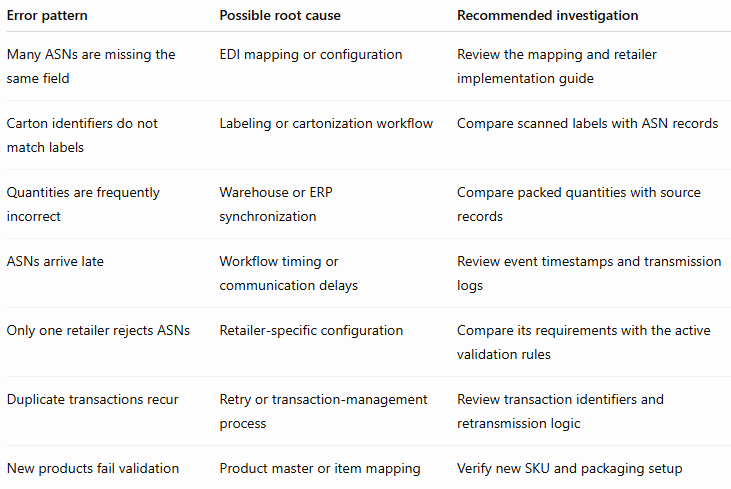
This analysis helps determine whether the best solution is a mapping correction, a warehouse process change, better system integration, or improved exception monitoring.
How SBSA Technology Helps Retail Vendors Improve EDI Workflows
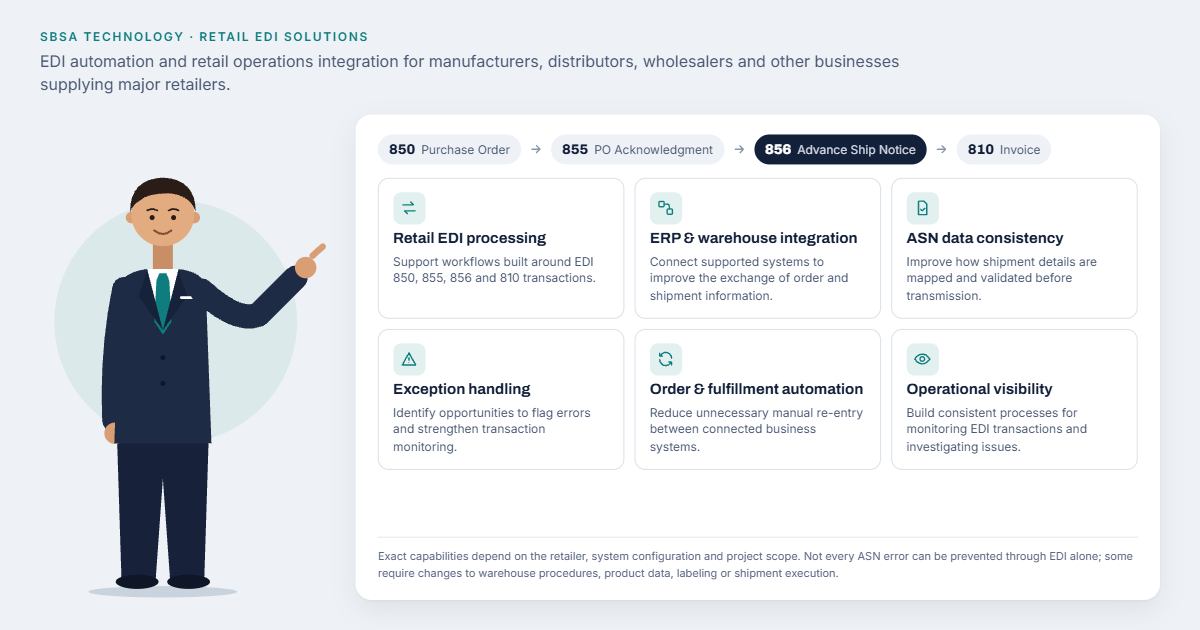 SBSA Technology provides EDI automation and retail operations integration capabilities for manufacturers, distributors, wholesalers, and other businesses supplying major retailers.
For businesses experiencing recurring ASN errors, the appropriate solution depends on the source of the problem, the existing systems, and the retailer's requirements.
SBSA Technology can help businesses evaluate opportunities to improve:
-
Retail EDI processing: Support workflows involving transactions such as EDI 850, 855, 856, and 810.
-
ERP and warehouse integration: Connect supported systems to improve the exchange of order and shipment information.
-
ASN data consistency: Improve how shipment details are mapped and validated before transmission.
-
Exception handling: Identify opportunities to flag errors and improve transaction monitoring.
-
Order and fulfillment automation: Reduce unnecessary manual re-entry between connected business systems.
-
Operational visibility: Help teams establish more consistent processes for monitoring EDI transactions and investigating issues.
The exact capabilities depend on the retailer, system configuration, and project scope. Not every ASN error can be prevented through EDI alone; some require changes to warehouse procedures, product data, labeling, or shipment execution.
Ready to Review Your EDI Workflow?
If your team is dealing with recurring ASN errors, retailer rejections, or compliance chargebacks, SBSA Technology can help you evaluate your existing workflow and identify potential improvements.
Contact SBSA Technology to discuss your retail EDI and integration requirements.
- Book a demo: sbsatech.com/consultancy
- Talk to the team: sbsatech.com/contact
- Explore the platform: sbsatech.com
- More insights: sbsatech.com/blog