
EDI in Plain Terms
EDI replaces paper-based purchasing — faxed POs, emailed invoices, manually keyed shipment details — with a structured, standardized electronic exchange between two companies' systems. No re-keying, no lost paperwork, no waiting on someone to check an inbox.
For a distributor with the order volume Grainger handles across MRO, industrial, and safety products, that automation isn't optional. EDI is what lets Grainger issue purchase orders, confirm shipments, and process invoices at scale without an army of people manually reconciling documents. When a supplier and Grainger set up this ongoing electronic exchange, they become what's known as trading partners.
Why Grainger Requires It
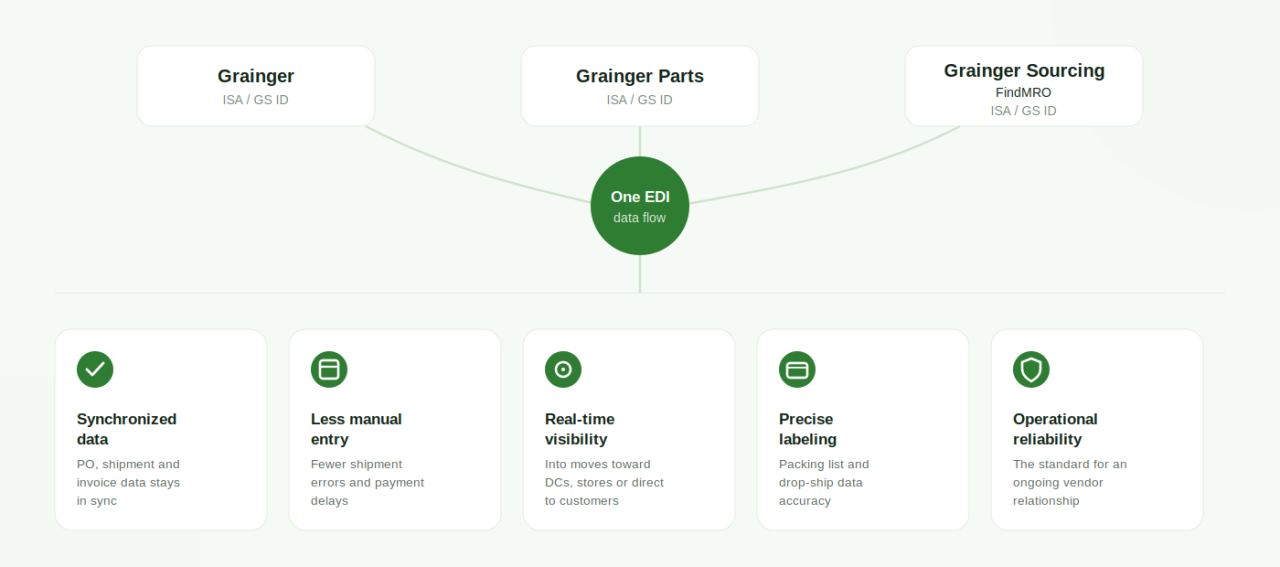
Grainger operates as one of the largest MRO (maintenance, repair, and operations) distributors in North America, moving purchase orders across multiple business units — Grainger, Grainger Parts, and Grainger Sourcing/FindMRO — each with its own ISA and GS identifiers. That scale, combined with drop-ship, direct-ship, and distribution-center fulfillment models running side by side, makes manual order processing impractical. EDI compliance matters to Grainger because it:
- Keeps purchase order, shipment, and invoice data accurate and synchronized between Grainger's systems and yours
- Reduces the manual data entry that leads to shipment errors, mispicks, and payment delays
- Gives both sides real-time visibility into what's moving toward Grainger's distribution centers, stores, or directly to end customers
- Supports the precise labeling, packing list, and drop-ship data requirements that Grainger's multi-business-unit model demands
- Builds the operational reliability Grainger expects from an ongoing vendor relationship
How Grainger and Its Suppliers Connect
Grainger exchanges EDI documents with suppliers primarily through the GXS (Global eXchange Services) network, a Value Added Network (VAN) that routes, translates, and confirms delivery of EDI transactions between trading partners. Many suppliers also connect via secure protocols like AS2 or SFTP, depending on what's mutually agreed with Grainger and supported by their EDI provider.
Regardless of the connection method, every EDI purchase order requires a 997 functional acknowledgment back to Grainger at the group level, confirming the transaction was received. Because Grainger issues purchase orders under different business units — each with its own ISA/GS identifiers — it's important to confirm which unit's connection details you've been set up under before you go live, since a mismatch here is one of the most common early onboarding issues.
Setting up a reliable connection — and correctly mapping your internal data into the X12 format Grainger expects — is typically far smoother with an established EDI partner or platform than building it from scratch in-house.
Which EDI Format Does Grainger Use?
Grainger transactions run on ANSI X12, the core American EDI standard used across U.S. retail and distribution. Each transaction type has its own document number — an 850 for a purchase order, an 856 for a shipment notice, and so on — and the underlying goal is the same one every major trading partner shares: structured data that both your system and Grainger's system interpret identically, with no ambiguity and no manual cleanup on either end.
One detail specific to Grainger: purchase order numbers typically begin with 46 for orders from Grainger itself, or 48 for orders from Grainger Sourcing. Suppliers working with both will see both prefixes and should map their systems to recognize each correctly, since order handling and internal routing can differ depending on which one you're fulfilling.
The Two Building Blocks of EDI: Translation and Transmission
Translation comes first. Whatever your ERP, WMS, or accounting system produces internally — a purchase order confirmation, an invoice, a shipping record — has to be converted into the standardized EDI document Grainger's systems expect, regardless of what software generated it on your end.
Transmission comes next. That translated document is sent securely to Grainger, typically through the GXS VAN or a direct AS2/SFTP connection, so it arrives intact without anyone needing to intervene manually.
Together, these two steps are what keep purchase orders, acknowledgments, shipments, and invoices flowing automatically once you're live.
Step-by-Step: Becoming an EDI-Ready Grainger Supplier
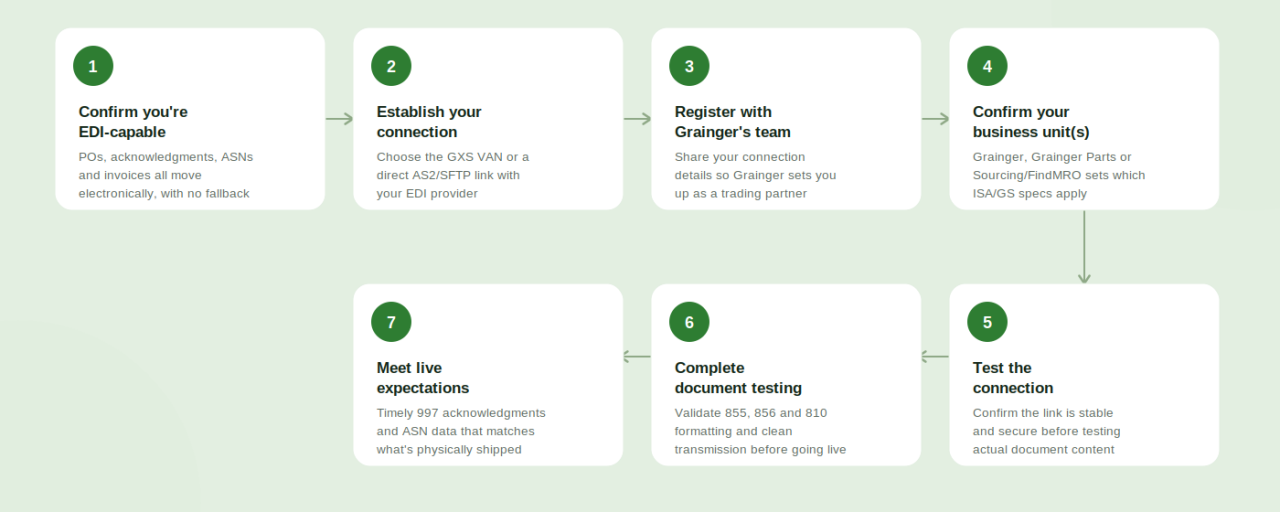
Grainger doesn't mandate a specific EDI software vendor, but onboarding follows a fairly consistent path across new vendors:
1. Confirm you're EDI-capable. Every core document — POs, acknowledgments, ASNs, invoices — needs to move electronically. There's no ongoing manual fallback once you're set up as a trading partner.
2. Establish your connection. Decide whether you'll connect through the GXS VAN or a direct AS2/SFTP link, and get that connection configured with your EDI solution or provider.
3. Register with Grainger's EDI/vendor team. Provide your connection details so Grainger can set you up as a trading partner under the correct business unit(s) and route documents to and from your system correctly.
4. Confirm which business unit(s) apply. Whether you're fulfilling for Grainger, Grainger Parts, Grainger Sourcing/FindMRO — or more than one — determines which ISA/GS identifiers and specs you'll be tested against.
5. Test the connection. Confirm the link itself is stable and secure before testing actual document content — this is a separate step from validating transaction data.
6. Complete document testing. Validate that your 855 acknowledgments, 856 ASNs, and 810 invoices are formatted correctly and transmit cleanly before you start receiving live orders.
7. Meet Grainger's acknowledgment and shipment expectations once live. Purchase orders need a timely 997 functional acknowledgment, and shipments need ASN data that matches what's physically shipped — missing either creates downstream delays that show up as compliance issues.
The EDI Documents You'll Actually Use
Grainger relies on a core set of X12 transactions to run its vendor relationships. The exact required vs. optional list can vary by business unit and program, but these are the ones most suppliers will see:
- 850 – Purchase Order: The order itself, sent from Grainger to you. Look for PO numbers beginning with 46 (Grainger) or 48 (Grainger Sourcing)
- 855 – Purchase Order Acknowledgment: Your confirmation that you received and accept (or flag issues with) the PO
- 856 – Advance Ship Notice (ASN): Details of what's shipping, how it's packed, and when it will arrive — this data must line up with your packing list and any drop-ship customer details on third-party orders
- 810 – Invoice: Your electronic invoice for goods shipped
- 997 – Functional Acknowledgment: Required back to Grainger for every 850 purchase order, confirming the transaction was received and readable
- 820 – Payment Order/Remittance Advice: Used by Grainger to communicate payment and remittance details
- 860 – Purchase Order Change Request: Buyer-initiated changes to a previously issued PO
- 852 – Product Activity Data: Inventory and sales activity data, used on certain programs
Depending on your category, program, and whether you're a direct-ship, warehouse, or drop-ship supplier, you may also handle additional transactions such as text messages (864) or freight invoices (210).
Where Grainger Compliance Gets Strict: Labeling, Packing Lists, and Drop-Ship Data
Grainger's supplier base spans warehouse replenishment, direct-to-store, and drop-ship-to-customer orders — often within the same account. That mix means the data on your 856 ASN has to do more than describe a shipment; on third-party and drop-ship orders, it also needs to carry the correct customer purchase order number, project or job number, and freight account details pulled directly from the original 850. Grainger also expects GS1-128 (UCC-128) labeling on cartons and customized packing slips that match what's on the ASN. A shipment that's technically EDI-compliant but carries mismatched customer or freight data on a drop-ship order can still trigger a chargeback or a rejected shipment — so packing list and label accuracy has to be treated as part of the same process as your EDI setup, not a separate afterthought.
Choosing the Right EDI Translation Approach
Whatever tool you use, its job is the same: reliably convert your internal data into the X12 structure Grainger expects, and translate incoming Grainger documents back into a format your ERP or WMS can use. The quality of that mapping — and how well it's tested against the specific business unit(s), PO prefixes, and drop-ship data rules that apply to your account — directly affects how smoothly your orders, acknowledgments, and invoices flow once you're live.
How SBSA Technology Can Help
Standing up a compliant EDI connection and getting your Grainger document mapping right on the first try isn't trivial — especially with multiple business units, PO number prefixes, and drop-ship data rules layered on top of standard EDI compliance. SBSA Technology helps suppliers plan, configure, and validate their Grainger EDI integration from initial connection through document testing, so you're not troubleshooting connection or compliance issues on your own timeline.
Conclusion
Grainger's EDI requirements aren't just a technical checkbox — they're tied directly to how reliably your shipments get accepted, your invoices get paid, and your relationship with Grainger holds up over time. Get your connection, business-unit setup, and document mapping right up front, and the day-to-day exchange of purchase orders, acknowledgments, and invoices becomes largely automatic. Rush or skip a step, and you'll be fielding delays, rejected shipments, or chargebacks right when you're trying to build momentum as a new vendor.
Connect with SBSA Technology
Ready to get compliant with Grainger — or want a second opinion on your current EDI setup? SBSA Technology works with retail suppliers, distributors, e-commerce brands, and 3PL providers to automate EDI, order processing, and retailer compliance.
- Book a demo: sbsatech.com/consultancy
- Talk to the team: sbsatech.com/contact
- Explore the platform: sbsatech.com
- More insights: sbsatech.com/blog