
EDI in Plain Terms
EDI replaces paper and email-based business documents — purchase orders, invoices, shipment notices — with a structured electronic format that two companies' systems can exchange automatically, without anyone re-typing data on either end.
For a cooperative the size of Ace, that automation isn't optional. Thousands of independently owned stores are placing orders, tracking shipments, and processing payments through a shared supply chain infrastructure. EDI is what keeps that volume moving without manual bottlenecks, reduces data-entry errors, and gives both Ace and its suppliers real-time visibility into order status. Companies that maintain this kind of ongoing electronic exchange are known as trading partners.
Why Ace Hardware Requires It
Ace's EDI program touches the full order-to-cash cycle — and extends into inventory planning and chargeback management. It's a core part of doing business with Ace because it:
- Keeps item, order, and shipment data synchronized between your systems and Ace's
- Eliminates manual re-keying and the transcription errors that come with it
- Feeds Ace's OTIF (On-Time, In-Full) tracking, which directly affects your standing as a vendor
- Prevents avoidable chargebacks tied to late shipment notices, mismatched invoices, or paper-based documents
When mappings drift, item masters fall out of sync, or an ASN slips past its cutoff, the consequences aren't abstract — they show up as fees, held payments, and manual investigations.
How Ace Hardware and Its Suppliers Connect: AS2
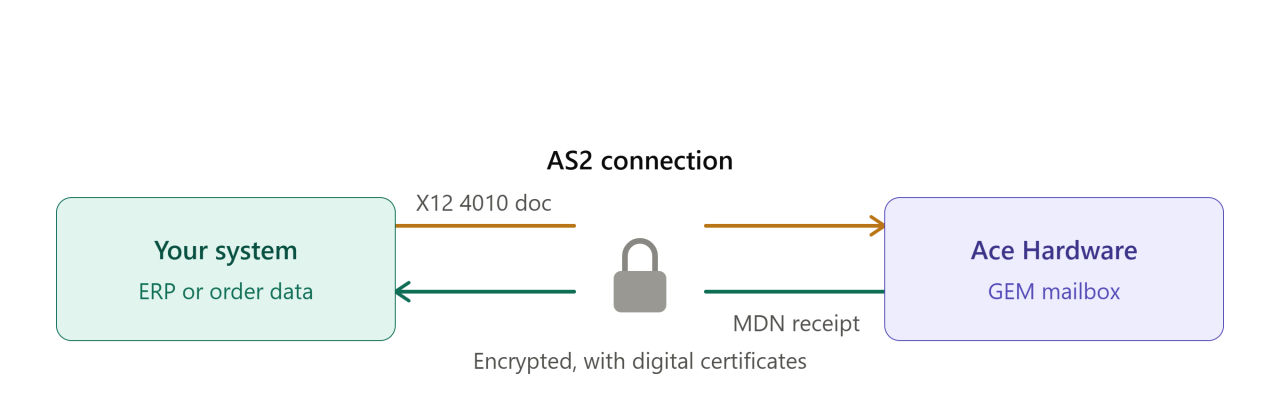 Ace standardizes on AS2 (Applicability Statement 2), the same secure transmission protocol used by most major retailers. AS2 combines encryption and digital certificates to protect data in transit, and it returns Message Disposition Notifications (MDNs) so both sides can confirm a document actually arrived intact.
Ace's EDI team works with X12 version 4010 messages sent over an AS2 connection. Getting that connection configured correctly — and mapping your internal data into X12 accurately — is usually smoother with an established EDI partner than building it in-house from scratch.
Which EDI Format Does Ace Hardware Use?
Ace works in ANSI X12, release 4010, across its core document set. This isn't a case of choosing between multiple standards depending on transaction type — Ace's vendor network runs on a consistent X12 4010 implementation, which simplifies onboarding but still requires precise adherence to Ace's specific guidelines for each transaction (item cross-references, pack sizes, and code qualifiers all need to match Ace's expectations, not just the generic X12 spec).
The Two Building Blocks of EDI: Translation and Transmission
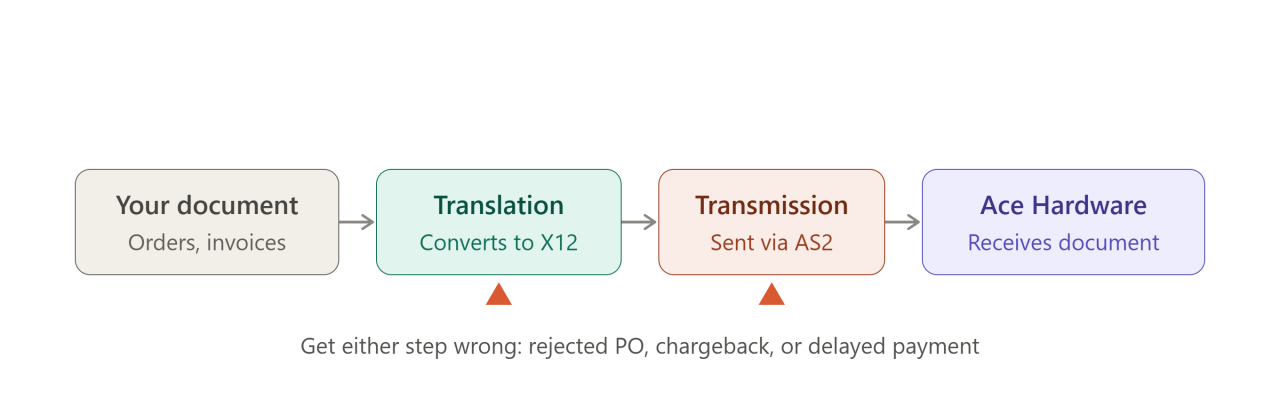 Translation comes first. Whatever your ERP or accounting system produces — a purchase order, an invoice, a shipment record — has to be converted into the X12 structure Ace's systems expect, regardless of what software generated it originally.
Transmission comes next. The translated document is sent securely to Ace, over AS2, so it arrives intact without manual intervention.
Get either step wrong — a mistranslated field or an unstable connection — and the failure shows up downstream as a rejected PO, a chargeback, or a delayed payment.
Step-by-Step: Becoming an EDI-Ready Ace Hardware Supplier
Ace doesn't require a specific EDI software vendor, but onboarding follows a defined path:
1. Confirm you're EDI-capable. Every core document — POs, ASNs, invoices — needs to move electronically. There's no ongoing manual fallback once you're a compliant vendor.
2. Set up your AS2 environment. Configure your AS2 software and gather the technical details Ace will need: your AS2 identifier, IP address, and digital certificates.
3. Complete Ace's vendor compliance paperwork. Before technical setup begins, Ace requires a signed EDI trading partner agreement and an EDI partner profile form specifying which document flows you'll support. Drop-ship-only vendors, for example, won't implement the 850/856 flow the same way a warehouse-shipped vendor does — so this form determines your actual transaction footprint.
4. Register with Ace's EDI team. Send your connection details to Ace's EDI department so they can provision your mailbox and exchange certificates.
5. Test the AS2 connection. Run connectivity tests to confirm the link is secure and stable before touching real documents.
6. Confirm active items before document testing. You can't validate POs or invoices without live item data behind them — check with your Ace buyer or vendor relations contact that your items are set up correctly first.
7. Complete document testing. Validate that your 850s, 855s, 856s, and 810s are formatted correctly and transmit cleanly before going live.
8. Maintain acknowledgment and shipment timing once live. Ace's OTIF program tracks how consistently you ship complete orders on time, and ASNs need to go out ahead of cutoffs — not after the truck has already left.
The EDI Documents You'll Actually Use
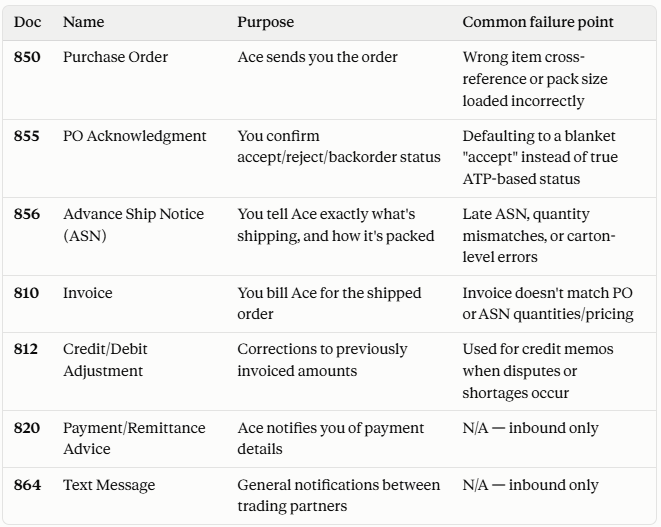
A single mismatched field on an 856 or a late ASN doesn't just create a paperwork headache — it can drag down your OTIF score and trigger chargebacks that are far more expensive to unwind after the fact than to prevent up front.
Choosing the Right EDI Translation Approach
Whatever tool sits behind your Ace integration, its job is the same: take your internal order and shipment data and reliably convert it into X12 4010, and convert Ace's inbound X12 documents back into something your ERP can use. The quality of that mapping — especially around item cross-references and pack-size logic — is what determines whether your day-to-day order flow is smooth or a constant source of manual fixes.
How SBSA Technology Can Help
Standing up a compliant AS2 connection and getting your item and document mapping right the first time isn't trivial — and getting it wrong costs you in onboarding delays, chargebacks, or held payments once you're live. SBSA Technology helps suppliers configure and validate their Ace Hardware EDI integration from AS2 setup through document testing, so you're not troubleshooting connection or mapping issues on your own.
Frequently Asked Questions
Does Ace Hardware require EDI from every supplier?
Yes. Core documents — POs, ASNs, invoices — must be exchanged electronically as part of standard vendor compliance.
Which EDI documents matter most?
The 850 (PO), 855 (PO acknowledgment), 856 (ASN), and 810 (invoice) form the core cycle. Depending on your vendor type, you may also need the 812, 820, or 864.
What EDI standard does Ace use?
ANSI X12, release 4010, transmitted over AS2.
Do I need a specific software product?
No — Ace doesn't mandate a particular vendor. You need a solution that produces valid X12 4010 documents and connects reliably over AS2.
Does EDI compliance affect my OTIF score?
Yes. Late or inaccurate ASNs are one of the most common drivers of OTIF penalties, since Ace's on-time and in-full tracking depends on accurate, timely shipment data.
Conclusion
Ace Hardware's EDI requirements aren't a formality tucked into a vendor packet — they're the operational backbone of how orders, shipments, and payments actually move between your business and Ace's. Get the AS2 connection, vendor compliance paperwork, and document testing right early, and the day-to-day exchange becomes largely automatic. Skip a step or let mappings drift, and you'll be dealing with chargebacks and OTIF hits instead of shipping product.
Connect with SBSA Technology
Ready to get compliant with Ace Hardware — or want a second opinion on your current EDI setup? SBSA Technology works with retail suppliers, distributors, and e-commerce brands to automate EDI, order processing, and retailer compliance.
- Book a demo: sbsatech.com/consultancy
- Talk to the team: sbsatech.com/contact
- Explore the platform: sbsatech.com
- More insights: sbsatech.com/blog